
CCTV Installation in Newmarket
Cameras planned around what you actually need to see — entry points, driveways, tills and loading doors — wired properly, recorded locally, and aimed only at your own property.

Quick answer
CCTV installation is a camera layout problem before it is a hardware problem. A useful system covers every entry point at a resolution high enough to identify a face, records to a local NVR or to the cloud for a set retention period, and points only at property the owner controls. Four cameras cover most Newmarket homes; eight cover most small shops.
Most camera systems in Newmarket houses record everything and prove nothing. The footage exists — it just shows a hooded shape at forty pixels crossing a driveway in the dark, which tells the police that something happened and nothing about who did it. Getting a camera to identify a person is a decision made before the drill comes out of the van, not a setting you change afterwards. Good CCTV installation is mostly planning.
Any camera job comes down to three questions. Where do the cameras go, how does video get from the camera to the recorder, and where does the recording live and for how long. Answer those honestly and the hardware choice largely makes itself. Answer them by grabbing a boxed four-camera kit on a Saturday afternoon at Upper Canada Mall and you will usually spend the money twice.
We install for houses in Glenway Estates, Stonehaven, Summerhill and the older streets off Main Street South, and for the small businesses along Davis Drive, Mulock Drive and Leslie Street — retail counters, a couple of loading doors, a mechanic’s yard, a self-storage row. What follows is how we plan those jobs and roughly what they cost, including the parts most installers leave out of the quote.
Coverage planning: give every camera a job before you give it a bracket
Two kinds of camera exist, and mixing them up is the most common and most expensive mistake.
An overview camera watches a wide area so you can reconstruct what happened and in what order. An identification camera is aimed tightly at a choke point — a doorway, a till, a gate — close enough that a face fills a useful part of the frame. A wide-angle camera screwed to a garage gable is an overview camera whether you intended it to be one or not. You need both, and you need to know which is which.
- Front door, mounted at 2.4 to 2.8 m and angled down roughly 15 degrees. High enough to be out of reach, low enough that you capture a face rather than the top of a hood.
- Driveway, aimed across it rather than straight down it, so a plate and a person crossing the frame both stay in focus and in frame long enough to matter.
- The side gate or the path down the side of the house — the route most suburban break-ins actually use, because a six-foot fence hides the work from the street.
- Rear patio or walk-out door. On a 1990s Newmarket subdivision backing onto a greenbelt or a school field, this is routinely the least overlooked door on the property.
- For a shop: the till at head height behind the counter, the customer side of the front door, the stockroom door, and the loading or delivery door.
- One camera watching the recorder itself, if the recorder sits anywhere a thief could reach in the first ninety seconds.
Write the job of each camera on the plan in plain words — identify at the front door, overview of the yard, plate capture at the gate. Six months later, when someone suggests moving a camera to cover the barbecue, you will have a reason to say no.
Resolution and night performance, without the marketing
Resolution is only meaningful when you express it as pixels across the thing you want to see. The working rule installers use is pixels per metre at the target: roughly 250 pixels per metre to recognise somebody you already know, and around 500 per metre to identify a stranger from the footage alone. A 4 MP camera puts about 2,560 pixels across the frame. Aim it at a 5-metre driveway and you get 512 pixels per metre, which is enough. Aim the identical camera across a 12-metre yard and you are down to 210 — that is an overview camera now, whatever the box said.
Night is where cheap cameras come apart. Infrared illumination turns the picture monochrome and blows out anything within two metres of the lens, so a camera tucked deep under a soffit lights up the soffit beautifully and leaves the driveway black. Cameras with a larger sensor and a wider aperture hold colour down into very low light, which gives you clothing colour and vehicle colour — things infrared will never give you. In practice: mount near an existing porch or soffit light, keep spiders and their webs off the housing, and judge the picture at eleven at night in February rather than at two in the afternoon in June. Ontario winters also mean condensation and freeze-thaw, so housings need a proper rating and the cable entry needs sealing, not taping.
Wired, wireless or PoE — and why PoE usually wins
PoE (power over Ethernet)
A single Cat6 cable carries both video and power to each camera from the recorder or a switch. No outlet needed at the camera, no radio interference, no batteries to change. This is what goes on almost every job where cable can be run.
Coax and analogue HD
Sensible where a building already has coax in the walls from an older system. Cheaper per camera, but resolution tops out lower and you still need mains power at every camera position.
Wi-Fi cameras
Fine for a rental, a detached garage or one awkward corner. They still need mains power, they compete with every other device on your network, and a router reboot can drop them silently for days before anyone notices.
Battery cameras
Genuinely useful at a shed, a fence line or a seasonal property. They wake on motion, so they miss the first second or two, and in a Newmarket January the battery life you were quoted roughly halves.
Running cable through a finished house is the part people underestimate, and it is the biggest single variable in a residential quote. From an unfinished basement to a soffit on the same side of the house is straightforward. Reaching the far gable of a two-storey with a finished basement below and no attic access might mean going outside in conduit or fishing down an interior wall. Ask any installer to describe the cable route before you accept a price. If they will not, the price is not real.
Local NVR or cloud recording, and what each costs to keep running
This is the decision with an ongoing bill attached, so it deserves ten minutes of thought rather than a shrug at the counter.
| Local NVR | Cloud recording | |
|---|---|---|
| Up-front cost | $300 – $700 for the recorder plus a surveillance-grade drive | Often little or nothing beyond the cameras |
| Ongoing cost | None, beyond a replacement drive every three to five years | Roughly $6 – $20 per camera per month |
| If the recorder is stolen | Footage goes with it, unless clips are mirrored off-site | Footage is already off-site |
| During an internet outage | Keeps recording locally | Stops, or falls back to limited onboard storage |
| Typical retention | 14 – 60 days depending on drive size and camera count | 7 – 30 days depending on the plan you pay for |
| Who can access it | You, on your own network and through the app | You, plus whoever operates the service |
Retention matters more than most people expect. A break-in gets noticed the same night. Staff theft, a delivery dispute or a slow vandalism problem usually surfaces two or three weeks later, by which point a seven-day loop has already written over the evidence. For a house, 14 to 30 days is comfortable. For a business, aim at 30, and understand that it is mostly a hard-drive decision — eight 4 MP cameras recording on motion in H.265 will fill roughly 4 to 6 TB over thirty days. A hybrid setup, local NVR with cloud copies of motion clips only, gets you the theft protection without the full monthly bill.
These are typical 2026 Newmarket ranges rather than quotes. Overnight, weekend and statutory holiday work carries a premium, and a firm price is confirmed on the phone before a technician is dispatched.
Where a camera is not allowed to point
This part is the property owner’s legal responsibility rather than the installer’s, and it is worth being blunt about before the brackets go up.
- A camera must not be aimed into a neighbour’s yard, windows or private outdoor space. Aim at your own property line and use the camera’s privacy-mask function to black out anything that spills over the fence.
- Never install a camera in a bathroom, a change room, a bedroom, or anywhere else a person reasonably expects privacy. In a business that includes staff washrooms and change areas, without exception.
- Catching a sidewalk or road incidentally while covering your own driveway is normally accepted. A camera aimed primarily at the street, or at the house across the road, is not.
- Recording employees at work engages Ontario privacy expectations and often the employment agreement as well. Tell staff in writing, post a visible notice at the entrances, and keep footage for a defined period rather than indefinitely.
- Audio is treated far more strictly than video. Most small-business installs are better off with the microphones switched off in the camera settings.
- Decide before go-live who is allowed to view and export footage, and keep a short log of every clip handed to anyone, including the police.
None of that is legal advice, and a lawyer is the right person to ask about a specific dispute or a formal complaint. What we can do is site and mask the cameras so the system is defensible from the first day, which is a great deal easier than re-aiming eight cameras after a neighbour has already complained.
Cameras, doors and the hardware they protect
Cameras record what happened. Locks decide whether it happens. Nearly every camera job we do in Newmarket ends up including at least one piece of door hardware, because the camera keeps pointing at a door that anyone could shoulder open.
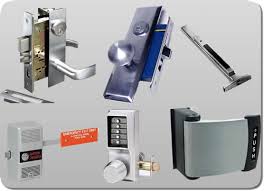


If the front door camera is watching a builder-grade knob set with a 12 mm strike screw, the camera is the wrong purchase to make first. A Grade 1 deadbolt with 75 mm screws into the stud costs a fraction of a camera system and stops the event rather than filming it. We will say so on the phone rather than after the invoice.
Realistic budgets for a 4-camera and an 8-camera install
Supplied and installed, including cable, connectors, the recorder and its drive, configuration, and half an hour showing you how to find and export a clip when you need it.
| System | Typical installed range (CAD) | What it realistically covers |
|---|---|---|
| 4-camera 4 MP PoE, 2 TB NVR | $1,150 – $1,900 | A typical Newmarket detached home: front door, driveway, side gate, rear door |
| 4-camera 4K PoE, 4 TB NVR | $1,600 – $2,600 | The same coverage with identification-grade detail at the driveway and front door |
| 8-camera 4 MP PoE, 4–6 TB NVR | $2,200 – $3,600 | Small retail or a shop unit: entrance, till, stockroom, loading door, two yard views, two overviews |
| 8-camera 4K PoE, 8 TB NVR | $3,200 – $5,200 | Where plates, faces and product handling all need to be legible on playback |
| Add one camera to an existing PoE system | $220 – $450 | Almost entirely a function of the cable run |
| Service call — fault, re-aim, firmware, drive replacement | $120 – $260 | Plus parts |
Ranges are typical and assume reasonable cable routes. A two-storey with a finished basement and no attic access sits at the top end. Overnight, weekend and statutory holiday work carries a premium. A firm price is confirmed on the phone before dispatch.
Why Newmarket homes and shops have us do the cameras
CCTV installation across Newmarket and the surrounding towns
Most installs are in Newmarket itself, where response to a service call is typically 20 to 30 minutes and a full install is booked for a half or full day. Camera work is scheduled rather than dispatched, so we can usually offer a slot within a few days.
We install across York Region and into South Simcoe as well. The technician drives from the Newmarket base, so add honest drive time for anywhere outside town — there is no shopfront in these places, just a van that gets there.
Frequently asked questions
How many cameras do I need for a house?
Four covers most Newmarket detached homes properly: front door, driveway, side gate or path, and the rear walk-out. Corner lots and homes with two side gates usually need five or six. More cameras is not automatically better — four well-aimed cameras beat eight scattered ones, because every camera you add is another view somebody has to scroll through at two in the morning.
Do I need internet for CCTV to work?
Not for recording. A local NVR records to its own hard drive whether or not the internet is up, which is one of the strongest arguments for local recording in a neighbourhood with unreliable service. You need internet only to view the cameras remotely on your phone, to receive alerts, or to push clips to the cloud. Cloud-only systems stop recording when the connection drops.
How long is footage kept before it is overwritten?
It depends on drive size, camera count and whether the system records continuously or on motion. A four-camera 4 MP system on a 2 TB drive recording on motion typically holds three to five weeks. Eight 4K cameras recording continuously on the same drive might hold five days. We size the drive to the retention you actually want and tell you the number before the install rather than after.
Can I point a camera at my neighbour’s driveway?
No. A camera should be aimed at property you own or control. If your driveway camera unavoidably picks up part of the neighbour’s, use the camera’s privacy mask to black that region out — it is a two-minute settings change and it prevents most disputes before they start. Deliberately aiming a camera into someone else’s yard, windows or private space is the thing that turns a security system into a legal problem.
Are wireless cameras good enough?
For one awkward position, a shed or a rental where you cannot run cable, yes. As a whole-house system, generally not. Wi-Fi cameras share bandwidth with everything else in the house, drop off after router reboots without telling you, and still need mains power at each position — which is most of the installation work anyway. If you are already pulling power to a spot, pull Cat6 instead.
Will the cameras keep working through a Newmarket winter?
Properly rated outdoor cameras will, and we only install ones that are. The failures we see in January are almost always installation shortcuts: an unsealed cable entry that lets moisture wick into the housing, a camera mounted where meltwater runs off a roof edge onto the lens, or a bracket on a south-facing wall that fogs on every freeze-thaw cycle. Positioning solves most of it.
Can you take over a system somebody else installed?
Usually. If it is a standard PoE system on a mainstream recorder, we can add cameras, re-aim what is there, replace a failed drive, set up remote viewing properly and configure privacy masks. Proprietary systems tied to a specific dealer are harder and sometimes not worth rescuing. Send a photo of the recorder and one camera and we can tell you on the phone.
Do cameras actually stop break-ins?
Visible cameras deter opportunists and do very little to a determined intruder. What they reliably do is give police something to work with, settle insurance questions, and answer the everyday disputes — the missing parcel, the scraped bumper, the after-hours delivery that never arrived. Treat cameras as evidence and hardware as prevention, and buy the hardware first if the budget only stretches to one.
Related locksmith services in Newmarket
Get a camera layout drawn for your property
Tell us what you need to see and we will tell you how many cameras it actually takes, where the cable runs, and what it costs to keep. Call 866-820-1331 — 24 hours a day, in Newmarket since 2000.