Access Control Systems in Newmarket
Keypads, intercoms, video entry, phone-based credentials and cloud platforms — and an honest look at what each one costs to run every year, not just to install.
Quick answer
Access control systems in Newmarket range from a $300 standalone keypad on one door to a cloud-managed multi-site platform at $1,800 to $3,500 per door installed. The install price is the smaller decision; software subscriptions, cellular fees and monitoring typically add $120 to $600 per door each year. Call 866-820-1331.
Choosing an access control system in Newmarket is mostly a question of how much administration you want to do, and where you want to do it from. Every system on the market unlocks a door. The differences are how a person is granted access, how quickly you can take it away, whether you can do that from your phone at 10 p.m., and what it costs you every year to keep the thing alive.
If you already know you want fobs or cards on a handful of doors, the detail you need is on our key fob and card access control page. This page is the wider view: keypads, intercoms and video entry, phone-based credentials, tying door hardware into your alarm, and the three architectures — standalone, networked and cloud — that everything else hangs off.
We have installed and repaired this equipment across Newmarket since 2000, in plazas along Davis Drive, medical suites near Southlake, warehouses off the 404 and condo and townhouse blocks near Yonge and Davis. What follows is what we would tell a business owner sitting across a desk, including the parts that argue against spending money.
The credential is the decision, not the brand
How people identify themselves at the door shapes cost, convenience and how badly things go wrong when someone leaves.
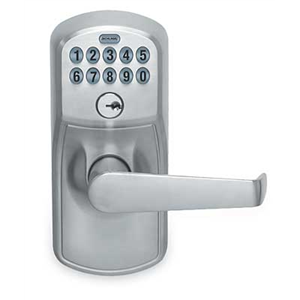
Keypad and PIN
Cheapest, no credentials to lose, works with no phone and no network. The weakness is human: codes get shared, written on the frame, and shoulder-surfed. Fine for a stockroom or a back door with three staff. Poor for twenty.
Fob, card or tag
One credential per person, revoked individually in seconds. The default for most small businesses. Fobs get lost and cloned low-end formats exist, so ask what the reader is actually reading before you buy.
Mobile and Bluetooth credentials
The credential lives in an app on the phone people already carry. Nothing to issue, nothing to collect on the last day. Costs more per user per year and depends on people keeping Bluetooth on and the app installed.
Intercom and video entry
For doors where someone has to be let in rather than let themselves in — a clinic reception, a condo lobby, a warehouse delivery door. Audio only is cheap; video entry that rings a phone costs more but removes the front desk from the equation.
Most Newmarket sites end up mixing them. A dental office might run fobs on the staff entrance, a keypad on the records room, and a video intercom at the patient door. There is no rule that says one building takes one credential, and pretending otherwise is how people end up paying for readers on doors that only ever needed a good lock.
Standalone, networked or cloud
This is the architecture question, and it decides your yearly bill more than the hardware does.
A standalone door has no connection to anything. The keypad or reader on the wall holds its own list of codes or fobs, and you program it at the door. It costs the least, it has no subscription, and it keeps working if the internet dies. It also means walking to every door to add a person, and no record of who went through when.
A networked system runs readers back to a controller panel in a cupboard, usually over Cat6, with software on a PC on your network. One place to add and remove people, proper time schedules, and an audit trail. No monthly fee in most cases, but you own the server, the backups and the software updates, and if the PC dies on a Friday it is your problem.
A cloud system puts the management platform on the vendor’s servers. You administer it from a browser or a phone from anywhere, updates happen without you, and multi-site is trivial. In exchange you pay per door per month forever, and if the subscription lapses you lose administration — the doors keep working, but you cannot change anything.
Our general advice for a Newmarket small business: one or two doors and a stable team, go standalone and spend the savings on better door hardware. Three to fifteen doors with staff turnover, cloud is usually worth it. Larger sites, or anywhere the internet is genuinely unreliable, look hard at networked.
What the door itself needs
A reader on the wall does nothing without something on the door that can be released electrically, and this is where budgets get blown. The hardware choice is driven by the door, not the system.
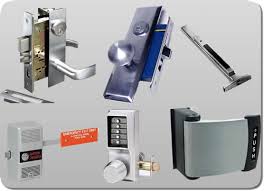
- Electric strike: replaces the strike plate in the frame, releases the existing latch. Cheapest, works on most wood and hollow-metal frames, needs enough frame depth.
- Electric mortise or cylindrical lockset: the lock itself is motorised. Neat, secure, better on fire-rated doors because it stays latched.
- Magnetic lock: a plate and an electromagnet, no moving parts, very strong. Requires a request-to-exit device and a means of egress that satisfies the fire inspector, which is a real constraint. See our magnetic door lock page.
- Power supply and battery backup: usually one central supply feeding several doors, sized so the doors behave correctly on a power cut.
- Request to exit: a motion sensor, a push bar switch or a button so people get out without presenting a credential.
- Door position switch: tells the system whether the door is actually shut, which is what turns access control into something you can audit.
- A door closer that works, because none of the above matters if the leaf never reaches the frame.
Fire-rated openings deserve a separate mention. A rated door has to positively latch, which rules maglocks out on many of them and pushes you toward an electrified lockset. If the door also has a panic bar, the exit hardware and the electrification have to be specified together — that is covered on our panic bar page. As with all exit hardware, the authority having jurisdiction decides what your specific opening requires.
Tying doors into your alarm and cameras
Access control and intruder alarm are separate systems that get more useful when they talk. The common integrations are worth understanding before a salesperson bundles them.
The simplest is arm and disarm at the door: the first valid credential in the morning disarms the alarm, the last one out at night arms it. It removes the keypad-by-the-door ritual and the shared alarm code that half the neighbourhood knows.
The second is alarm shunting. If a door is monitored by the alarm panel, a valid access grant tells the panel to ignore that door for the next few seconds so an authorised entry does not trip a siren. Without shunting, every legitimate entry looks like a break-in.
The third is camera linkage: every door event stamps a bookmark on the video so you can jump straight to the clip of that fob at that door at that minute, rather than scrubbing an hour of footage. That pairs naturally with camera installation, and it is the single feature owners say they use most after an incident.
You do not need any of this on day one. But if you think you will want it, say so before the panel is chosen, because retrofitting integration onto the wrong controller usually means buying the controller twice.
Access control costs in Newmarket: install and yearly
Install is the number everyone asks about. The yearly figure is the one that decides whether you still like the system in year four.
| System | Typical install, per door | Ongoing per door, per year |
|---|---|---|
| Standalone keypad on existing lock | $300 – $650 | $0 – $30 batteries |
| Standalone fob reader, one door | $550 – $1,100 | $0 – $40 spare fobs |
| Networked system, controller plus reader | $1,200 – $2,200 | $0 – $120 support and parts |
| Cloud-managed reader, per door | $1,400 – $2,600 | $180 – $420 subscription |
| Mobile or Bluetooth credentials | Add $150 – $400 to the above | $25 – $90 per active user |
| Audio intercom to one handset | $700 – $1,400 | $0 – $60 |
| Video entry to phone or tablet | $1,300 – $3,000 | $60 – $240 cloud and cellular |
| Alarm integration and door shunting | $250 – $700 one time | Included in alarm monitoring |
| Electric strike, supplied and fitted | $350 – $750 | Nil |
| Maglock with request to exit and egress hardware | $700 – $1,500 | Nil |
| Adding or removing a user | Included | Included |
| Service call for a reader or lock fault | $140 – $340 per visit | Budget one visit per year |
These are typical 2026 Newmarket ranges. Cabling runs, ceiling access, concrete block walls and long conduit runs move the install figure more than the hardware does. Overnight, weekend and statutory-holiday attendance carries a premium. A firm price is confirmed on the phone before dispatch.
Planning a system for a business that is going to grow
The most expensive access control systems we see in Newmarket are the ones bought for exactly the number of doors the business had at the time. Three years later the unit next door comes free, the company takes it, and the controller has no spare capacity — so the whole panel gets replaced to add two doors.
Four things make a system survivable. Buy a controller with more door capacity than you need, because the empty ports cost almost nothing at purchase and a great deal later. Pull spare cable while the ceiling is open, including to doors you have no plans for. Choose a credential format that a second installer can also supply, so you are not locked to one company. And keep the door hardware sensible, because a good electric strike outlives three generations of software.
The other half of planning is the boring half: decide who is allowed to add and remove users before the system goes in, and write it down. Access control fails as an administrative system long before it fails as an electrical one. If nobody owns the user list, in two years it contains people who left in 2024.
Why Newmarket businesses ask us to specify access control
Access control across York Region and South Simcoe
We design and install from a Newmarket base, so town sites get the fastest survey and the fastest service response — typically 20 to 30 minutes on an emergency door failure. Planned system work is booked to a time slot across the wider area.
Frequently asked questions
How much does access control cost for a small Newmarket business?
A single standalone keypad door is $300 to $650 fitted. A cloud-managed reader is $1,400 to $2,600 per door plus $180 to $420 a year in subscription. A typical three-door retail or clinic install lands somewhere between $2,500 and $7,000 depending on architecture, cabling and what has to happen to the doors themselves.
What is the difference between cloud and standalone access control?
Standalone stores users in the device at the door, has no monthly fee and keeps working with no internet, but you must walk to each door to make changes and you get no audit trail. Cloud stores everything on the vendor platform, so you administer from anywhere and get full logs, in exchange for a per-door subscription for as long as you use it.
Can staff use their phones instead of fobs?
Yes. Most current platforms support a mobile credential over Bluetooth or NFC, issued and revoked from the same admin screen as a fob. Expect $150 to $400 extra per door for a reader that supports it and $25 to $90 per active user per year. The upside is nothing to hand out and nothing to chase on someone last day.
Will the doors unlock if the power goes out?
That depends on how the door is specified, and it is a decision you should make deliberately. Fail-safe hardware unlocks on power loss, which suits an egress route. Fail-secure hardware stays locked, which suits a stockroom. Battery backup keeps a system running for hours either way. We walk through each door with you when the system is designed.
Can access control be connected to our alarm system?
Usually. The three common links are arming and disarming the alarm with a valid credential, shunting a monitored door so a legitimate entry does not trigger a siren, and bookmarking camera footage against door events. Say you want it before the controller is selected, because retrofitting it to the wrong panel means replacing the panel.
Do we need an intercom or is a reader enough?
A reader is for people who should let themselves in. An intercom is for people who should be let in — patients, customers, couriers. If someone at your front desk currently gets up to open the door for visitors, a video intercom that rings a handset or a phone pays for itself in interruptions saved.
What happens if we stop paying the cloud subscription?
On most platforms the doors keep functioning with the credentials already on them, but you lose the ability to add or remove users, change schedules or see logs. That is worth knowing before you commit. If a system that never has a bill is important to you, say so at design stage and we will steer you standalone or networked.
Can you take over a system somebody else installed?
Often, yes. It depends on whether the controller is a common platform and whether you hold the admin credentials for it. Bring us the panel model and any paperwork and we will tell you honestly whether it can be adopted, expanded, or whether the sensible move is to reuse the door hardware and change the head end.
Related locksmith services in Newmarket
Get an access control system specified for your Newmarket premises
Tell us how many doors, how many people and how often that list changes, and we will tell you which architecture makes sense and what it costs to install and to run. Call 866-820-1331.